
Retail IDs Configured in Metrc
Printing Retail IDs from Metrc in QRlogix Software
In order to print Retail IDs in QRlogix Software, users must first confirm that packages are configured properly in Metrc.
- Users should first confirm the package is a Finished Good.
- NY State = Must be marked Finished Goods in Metrc during the PACKAGE CREATION stage
- States other than NY = Retail ID packages must be created in the Finished Good stage (see image below).
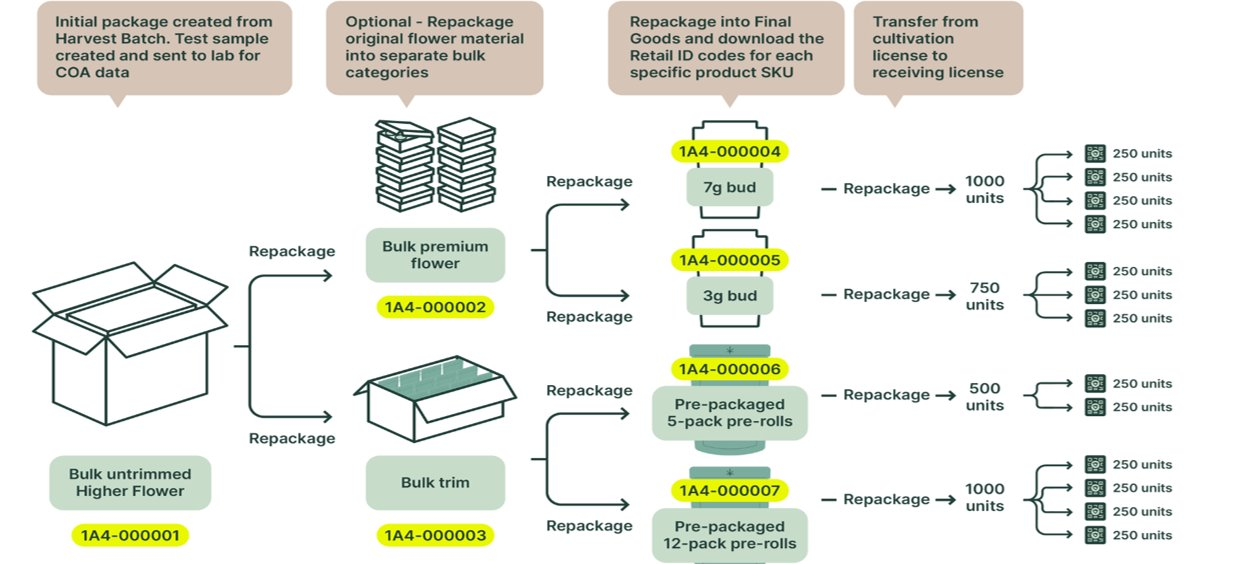
In the workflow diagram above, the units are shown at the 7g / 3g or 5-pack / 12-pack stage.
If assistance is needed for creating packages in Metrc, please reference Metrc support resources or contact a Metrc Expert to get help with the process.
Metrc Support or QRlogix Software Support?
COMING SOON! THANKS FOR YOUR PATIENCE! To resolve your situation as quickly as possible, it’s critical that you route your support inquiry to the correct company. We will soon provide a breakdown of support scenarios, and who you should contact to resolve your issue - Metrc Support vs QRlogix Support
 QRlogix Team
How to Get Help
Multiple ways to get support for QRlogix Software, including phone, email, video tutorials, user manuals, and in-app resources.
 QRlogix Team